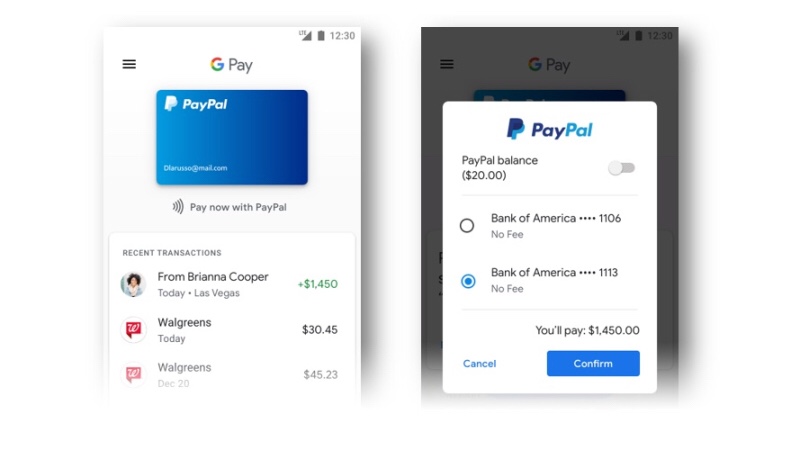
Introduction: In an exciting collaboration between Google and PayPal, users can now leverage their PayPal accounts seamlessly across the Google ecosystem, spanning platforms like YouTube, Gmail, and the Google Store. This means you can make purchases and transactions without the hassle of signing in to PayPal every time. This tutorial will guide you through the simple process of linking your PayPal account to Google Pay, unlocking a world of convenient and secure transactions.
- Step 1: Ensure Google Pay is Installed Before diving into the integration process, ensure that Google Pay is installed on your device. You can download it from the Google Play Store if you haven’t already.
- Step 2: Open Google Pay Launch the Google Pay app on your device. If it’s your first time using Google Pay, follow the on-screen instructions to set up your account.
- Step 3: Access Payment Methods Navigate to the «Payment methods» section within the Google Pay app. This is where you manage the various payment options linked to your Google Pay account.
- Step 4: Add PayPal to Google Pay Look for the option to add a payment method and select «Add PayPal.» Follow the prompts to link your PayPal account to Google Pay. You may be asked to log in to your PayPal account for authentication.
- Step 5: Authorize Permissions Google Pay will request the necessary permissions to access your PayPal account. Authorize these permissions to enable a smooth and secure integration between the two services.
- Step 6: Verify the Link After completing the integration, take a moment to verify that your PayPal account is successfully linked to Google Pay. You should see PayPal listed among your payment methods.
- Step 7: Explore Seamless Transactions With your PayPal account successfully linked, you can now make purchases on YouTube, Gmail, and the Google Store without the need to sign in to PayPal each time. Enjoy the convenience of a streamlined payment process.
To link your PayPal account to Google Pay, you can follow these steps:
On an Android device:
- Open the Google Pay app.
- In the upper right corner, tap your profile photo and then «Wallet.»
- Tap «Add to Wallet» and select «Payment Card» and then «PayPal.»
- Follow the on-screen instructions to link your PayPal account to Google Pay.
On Google Play and other Google products:
- When you’re ready to pay for Google products, select «Add payment method.»
- Enter your PayPal information and accept the terms2.
Where you can use PayPal with Google Pay:
You can use your PayPal account with Google Pay to make purchases in stores that accept Mastercard Contactless payments, when purchasing in apps, and when paying in the Chrome mobile browser.These steps will allow you to link your PayPal account to Google Pay and use it to make purchases on YouTube, Gmail, and Google Play.
Conclusion: By integrating PayPal with Google Pay, you’ve unlocked a seamless and secure payment experience across multiple Google platforms. This collaboration enhances the user experience, allowing you to make transactions effortlessly. Say goodbye to the repetitive task of signing in, and embrace the convenience of using your PayPal account across the Google ecosystem. Happy transacting!
What are the benefits of linking paypal to google pay
By linking your PayPal account to Google Pay, you can enjoy several benefits:
- Faster checkout experience : Once users link their PayPal account, they don’t need to log in to PayPal every time they want to make a transaction, streamlining the checkout process.
- Higher conversion : By reducing the steps required for payment, the conversion rate can be increased as customers will enjoy a simpler and faster checkout process.
- PayPal Advantages : Customers will retain all the benefits associated with their PayPal account, such as Purchase Protection and Return Shipping, plus the fast and easy Google Pay payment experience and greater security.
- Benefits for merchants : Merchants who enable PayPal acceptance through Google Pay can continue to enjoy the benefits they already have with PayPal, such as the ability to receive payments directly to their PayPal merchant account in minutes, with no minimum deposit requirements. processing and seller protection on eligible transactions.
By linking your PayPal account to Google Pay, you can use it to make purchases on YouTube, Gmail, and Google Play, as well as in stores that accept Mastercard Contactless payments, and when purchasing in apps and paying in the Chrome mobile browser.
 Estrategias efectivas para tu negocio.
Deja un comentario